Writing High Quality Production Code with LLMs is a Solved Problem
How I write 99% of my code at Airbnb with LLMs

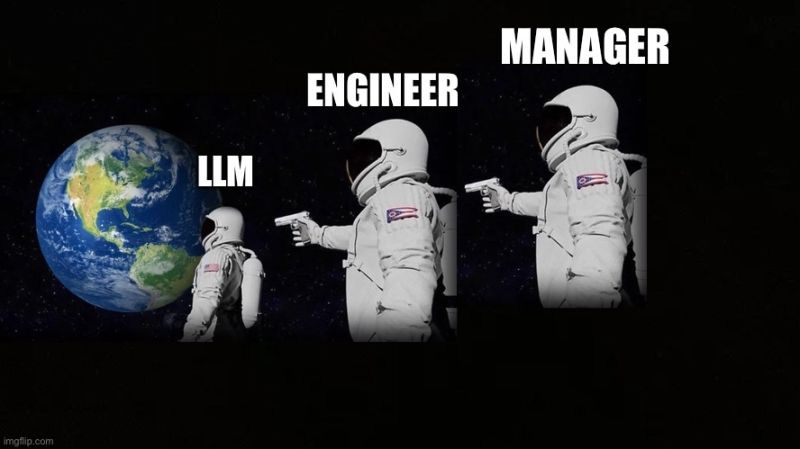
I’ve been writing 99% of my code at Airbnb with LLMs. If you think this is a bold claim it means you’re doing it wrong.
Spotify’s CEO recently announced something similar. I mention my employer not because my workflow is sponsored by them, but to establish a baseline for the massive scale, reliability constraints, and code quality standards this approach has to survive.
I work in an environment with more than 1,000 microservices. This is not hype. I’m not talking about “Vibe Coding”. I’m talking about the true utility of LLMs as a tool for writing production software
Many engineers abandon LLMs because they run into big problems immediately, but these problems already have solutions.
The top problems are:
Constant refactors (generated code is really bad or broken)
Lack of context (the model doesn’t know your codebase, libraries, apis..etc)
Poor instruction following (the model doesn’t implement what you asked for)
Doom loops (the model can’t fix a bug and tries random things over and over again)
Complexity limits (inability to modify large codebases or create complex logic)
If you find yourself dealing with these problems, it means you tried to use the LLM like a magic wand instead of a power tool.
Magic wand → make a wish and see it come true
Power tool → measure, plan, apply tool to execute on that plan
In this article, we’ll explore how to solve each of these problems by using your LLM like a power tool.
#1 Constant refactors (generated code is really bad or broken)
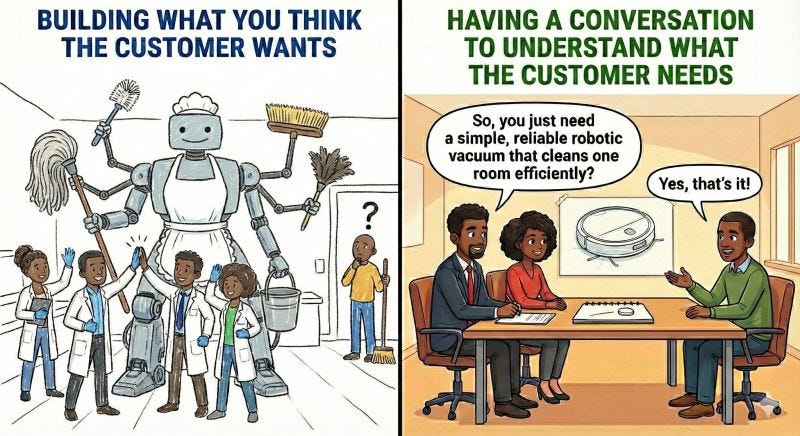
If you find yourself constantly refactoring AI-generated code, you are skipping the most important step: The Conversation.
In my 13 years as a Senior Engineer, I’ve seen communication gaps derail projects time and again. LLMs possess no magic to solve this. Intelligence cannot replace communication. Vague asks fail for humans, and they fail for AI too. The trick is to communicate. You need to talk to people and get explicit alignment through Specs/RFCs/design docs.
If you skip this you are behaving like an eager junior engineer rushing into implementation without a plan. This is magic wand mentality.
When you’re building high-quality production software, writing code is always the last step.
Your first step is to understand the problem. Then ideate solutions, consider alternatives, analyze tradeoffs and refine your exploration into a concrete plan.
Only after all this upfront design and planning work do you then start manually typing code with your fingers.
That last step is not necessary to do manually anymore. Whenever I think of coding, I immediately reach for an LLM because I use it like a power tool.
A carpenter does not leave their power drill on the table when they need to screw in a bolt.
Here’s the workflow that gives me high-quality code on the first write to disk:
The Conversation Workflow:
Explain the problem to the LLM in detail
Give it your ideas for the initial solution.
Tell it explicitly: “Propose an approach first. Show alternatives to my solution, highlight tradeoffs. Do not write code until I approve.”
Review the proposal, poke holes in it, and iterate.
Convert to Spec: Once you agree on the approach, ask the LLM to write a mini-spec or implementation plan.
Execute: Only then do you let it generate the code.
If you follow this sequence, you stop treating the LLM as a random number generator for syntax and more like a force multiplier for your own engineering decisions. A term gaining traction for this is Spec-Driven Development (SDD).
You are in the driver’s seat, providing direct technical guidance at every step. Your experience and skill level directly impact how good the solution is.
Once you have a spec, the LLM can help turn it into a simple task list: a set of concrete, ordered items with clear “done” criteria. This mirrors how you’d normally plan work and often surfaces gaps or missing requirements early.
To implement your plan, you run the same conversation workflow again, but this time the scope is one task and the output is code instead of a spec.
The “propose an approach first” and “Do not write code” instructions become the quality gate. Instead of relying on what the LLM would naturally write, you get an implementation plan that considers alternatives, tradeoffs, and edge cases before any code gets written.
You can’t outsource expertise, because you can’t outsource accountability. I never use LLMs to implement production code I don’t fundamentally understand, because the burden remains on me to:
Verify the logic
Ensure edge cases are handled
Maintain the system six months from now
Own the failures
No, this is not slower than doing it without LLMs. Because LLMs solve for mental fatigue, not just coding speed.
This is why I say LLMs are cognitive power tools.
In the same way that physical power tools let builders assemble structures at a scale that would be slow, inconsistent, and exhausting by hand, LLMs let us build higher-quality systems with less effort because we can explore multiple approaches to a problem deeply, iterate more, test more, refactor more, and still have energy left to make critical decisions.
This is far more impactful than just increased coding speed. We are not machines, our mental energy is finite. When done right, LLMs let us dedicate more brain power to higher leverage concerns for longer, and this leads to better quality not slop.
#2 Lack of context (the model doesn’t know your codebase, libraries, apis..etc)

New hires don’t have any context, don’t know the coding style guide, don’t know how the in-house APIs, frameworks or libraries work, don’t know the architecture, don’t know anything…
Does it mean that they’re not fit for the job? Of course not, they just need to ramp up! And luckily for us LLMs can ramp up faster than Neo learned Kung Fu in the Matrix.
If you’re implementing a feature within an existing codebase, before the conversation happens you need to set the context.
Treat each session with the LLM like you’re working with a highly skilled new hire that has the ability to instantly learn anything.
The Ramp Up
One take away I want you to get from the power tool analogy is that it’s more than one tool. You might be underutilizing your coding agent. It can do a lot more than just write code. It’s also a great tool for exploring and understanding codebases, something that before now we needed to spend a lot of time doing manually.
I work at a big tech company on features that span across multiple microservices. A few standards help make this a lot easier:
Monorepos, which have all the code in the same parent directory
RPC schemas like thrift/gRPC that outline the boundaries between services
If you ask a coding agent to start at the root directory, use a specific file path as its entry point, and recursively trace the code and all of its dependencies, it can draft documentation explaining how a particular feature or area works. It will take its time to crawl through the codebase and understand the relationships between different functions, endpoints and libraries.
It will see the imported libraries, api schemas, common patterns, everything. Just like how a human would have to do to get up to speed without documentation.
You can tell it to output documentation to disk including mermaid diagrams that explain the relationships between different components in the codebase. This is your context. Revise as needed and make it available in a docs/ folder for easy access. You can ask an LLM to read the file and it will be able to consider those details in its implementation from that point on.
You can also point your agent to third party documentation websites. I typically show specific doc pages that are relevant to the features of the library that I want to use and have it create a summarized version, highlighting methods, apis and best practices that gets written as another file in the docs folder. This helps it understand what the library does, which functions exist to call and what they return.
If you don’t give your agent network access you can also do this step with the chat products. Just drop the link in ChatGPT/Gemini/Claude and tell it to create a summarized docs. GPT-5 Pro, Gemini 3 Pro and Opus 4.6 w/extended Thinking are best for this.
Teaching Company Specific Coding Standards
Another part of ramp up is understanding the engineering principles of the organization which apply to the code base. Most coding agents allow you to define a system prompt using a markdown file in the root directory. Codex and Gemini CLI use AGENTS.md and Claude Code CLI uses CLAUDE.md.
You can use this system prompt to provide details such as the desired coding style, basics of writing clean code, guidance away from common issues (ex: “do not implement quick hacks”, “always think at a higher level and consider refactoring”, “do not hard code things in multiple places”...etc). Here you can also put the architecture of the codebase and common patterns you want it to apply.
This becomes your reusable “engineering brain” that the model loads at the start of every session, making it write high quality code by default.
#3 Poor instruction following (the model doesn’t understand your intent)
Choose the right model
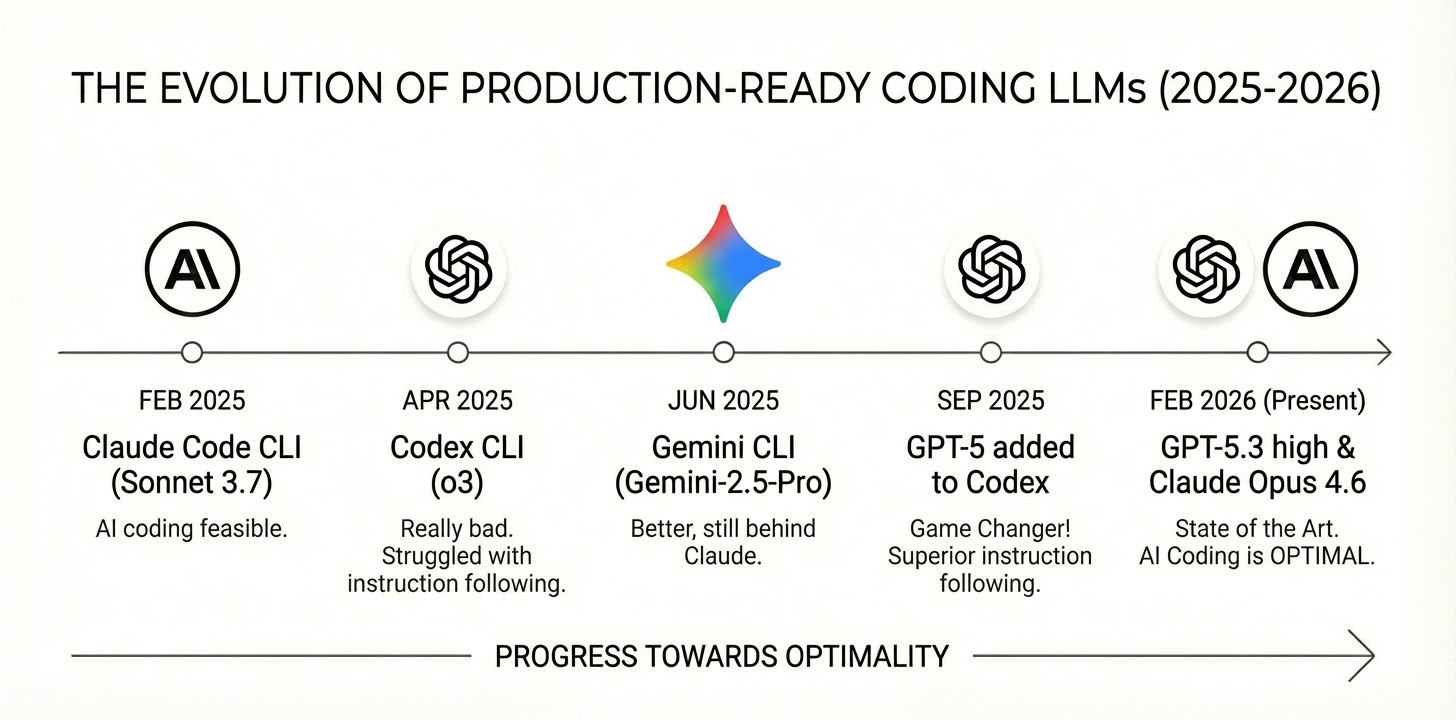
The reason why there’s so much debate about the usefulness of LLMs for building production quality code is that models are rapidly improving and people are stuck on different parts of the timeline.
A lot of the skeptics were “absolutely right”…12 months ago. It wasn’t until Anthropic released Claude Code CLI on February 24th, 2025 with Claude Sonnet 3.7 that a lot of this became feasible.
Today in 2026, with current state of the art models Opus 4.6 and GPT-5.3, writing all of your code with LLMs is not only feasible...it’s optimal.
I learned this the hard way starting in February 2025 with Claude Code CLI. When OpenAI’s Codex CLI landed in April 2025, it was really bad. It used o3 (state of the art at the time), which struggled with instruction following.
Instruction following is basically the model’s ability to reliably obey explicit constraints and intent. This is important for sticking to the spec, honoring “don’t do X,” and not introducing unrequested changes. Gemini CLI arrived in June 2025 with Gemini-2.5-Pro. This was much better than Codex + o3, but still noticeably behind Claude on instruction fidelity.
Fast forward to September 2025, OpenAI added GPT-5 support to Codex. And let me tell you, this was an absolute game changer. Keep in mind this was just 5 months ago. GPT-5-codex is touted as the model fine tuned for coding, but funny enough I’ve found that GPT-5’s base model to be superior because of its ability to follow instructions more closely.
Maybe GPT-5-codex is good for “Vibe Coding” but when you do Spec Driven Development, instruction following is the most important. It’s not just GPT-5, it’s “GPT-5 high”. These models come with different levels of “reasoning effort”, GPT-5 high outperforms the others while still being fast and cost effective.
If you don’t know any of these details you will get a bad impression if you’re using the lowest quality models.
Use the right tool. For most things I use GPT-5.3 high or Claude Opus 4.5
Claude Sonnet 4 and older versions of GPT-5 do just fine, but if you’re on a pro plan and not being charged per token, it’s advisable to use the smarter models. I have not yet tried Gemini 3 but it seems promising.
Manage your context
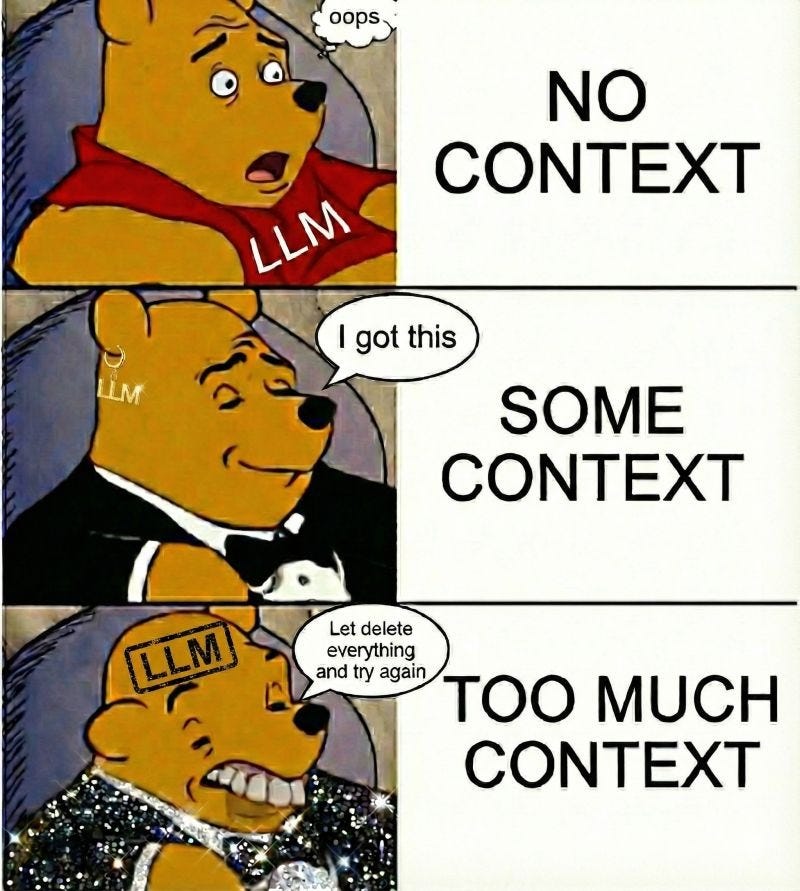
LLMs are stateless. They don’t actually “remember” anything you’ve said, even in the middle of a conversation.
Every single time you send a new message, the model has to re-read the entire chat history from the very beginning word for word before it generates a response. It’s like having to re-read a whole book every time you want to write the next sentence.
The maximum amount of text it can handle at once is called the “Context Window.” To give you a sense of scale, Gemini 3 has a massive ~1 million token window (roughly 1,500 pages of text), GPT-5 has ~400k (600 pages), and Claude Opus has ~200k (300 pages).
Context window is kind of a vanity metric. Just because a model can fit 1,500 pages of text into its window doesn’t mean it can actually reason about all of it effectively. As the conversation gets longer, the model has to juggle thousands of conflicting details and instructions, often leading it to “hallucinate” or ignore instructions it followed perfectly ten minutes ago.
Coding agents deal with an extreme version of this problem. Because every line of code they read or generate stays in the chat history, you can hit that 600-page limit surprisingly fast. The model gets confused by the history of old prompts and code changes, making it harder to focus on the current task.
The easiest way to fix this is to kill the session and start a fresh one. If you’re working on a completely new task this makes the most sense. But if you’re working on features that are related to each other or span across many areas, it’s useful to keep the same session for as long as possible so it follows the same train of thought.
All of the popular coding agent CLIs have a feature called /compact that summarizes the current chat history to fit in 1% of the window and let you continue in the same session.
In the beginning I did this manually because it didn’t capture enough relevant details. Nowadays the coding agents are pretty good at compacting the context, but in some situations I still do this manually by instructing the LLM to write a handoff document that describes what the goal is, the progress made and what’s left to do. This can be loaded in at the beginning of the next session by asking it to read the file.
I like to compact sessions after they reach around 20% remaining context window. This an improvement over the 40% threshold I used to use before the current generation of models.
#4 Doom loops (the model can’t fix a bug and tries random things over and over again)
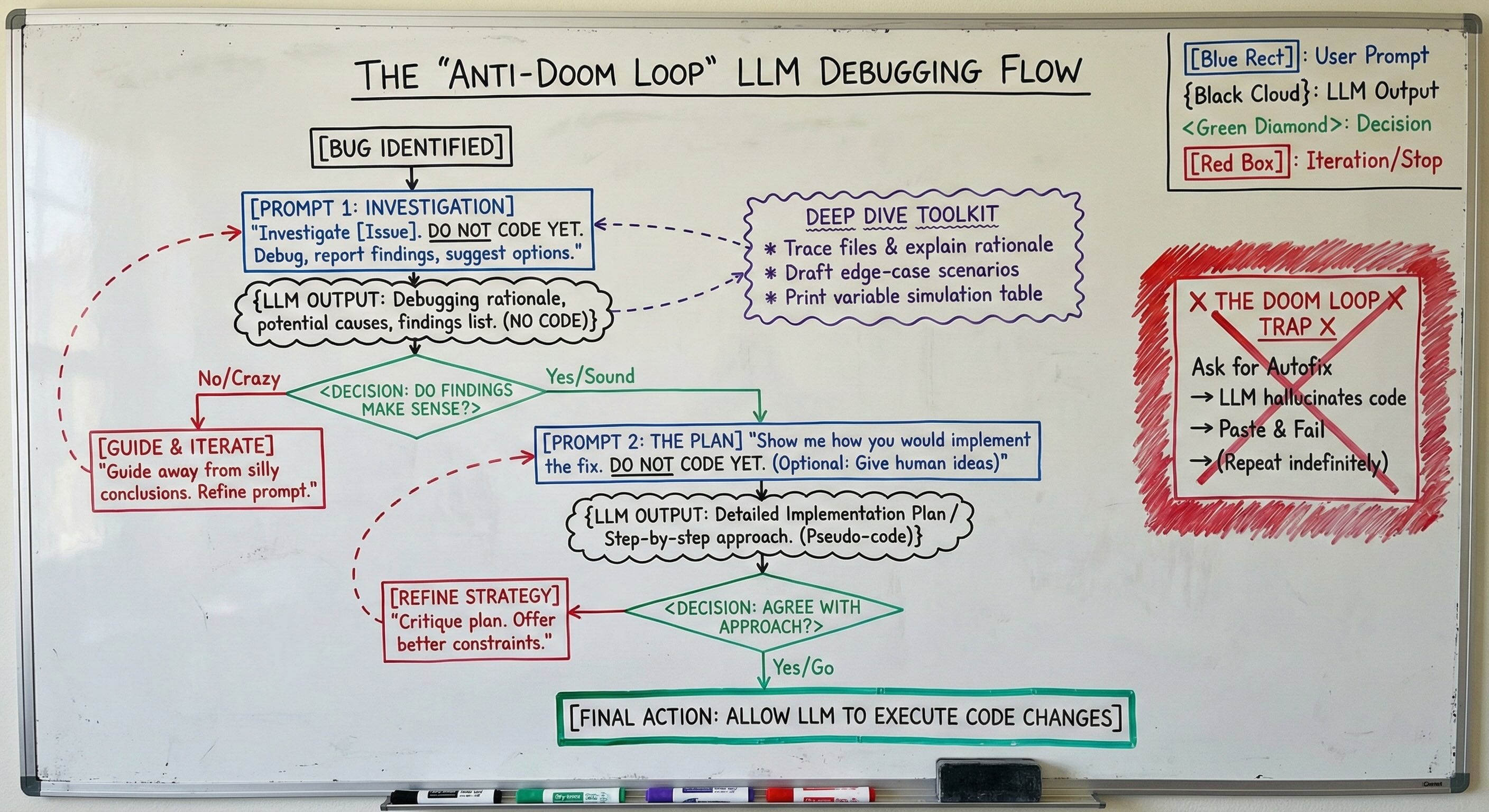
Doom loops are when you ask an LLM to fix a bug and then it makes rounds of code changes that don’t actually fix the issue or makes it even worse.
It might convince you LLMs are bad at fixing bugs but I’ve found LLMs a pretty amazing tool for debugging actually.
Don’t just slap the stack trace into the chat with no details and hope for the best.
The way I’ve found to resolve doom loops of fake bug fixes is to tell it: “Investigate [insert issue here]. Do not code yet. Just debug and report back with your findings and a few suggestions for how to fix it”.
Then you review its findings to see if it makes sense. Sometimes it’ll say crazy things, but having told it not to code and wait for feedback prevents it from entering the doom loop. Then I can guide it away from silly conclusions and iterate to find the likely cause.
When I have confidence in the conclusion about the root cause, I ask it to show me how it would implement a fix but “do not code”. I also give it my ideas for an approach if it’s complex. Only after I agree with the implementation plan do I allow it to make the code changes.
You can also go deep and ask it to trace through files and list out its rationale for what it thinks the issue is. You can have it draft up a bunch of sample scenarios that can lead to the edge case. Even have it print a table that simulates what the values of variables would be after executing code with different inputs.
It’s not an auto-fix, but still a worthwhile accelerator for investigation and discovery which is powerful.
#5 Complexity limits (inability to modify large codebases or create complex logic)
So far we’ve learned how you can “Ramp Up” an LLM like a new hire and tackle long scale code changes using a “Hand Off” approach to get around context window limits. We also established that “The Conversation” is non-negotiable for planning before coding.
These are the prerequisites. But the final boss is Complexity.
No human engineer sits down and writes a complex feature spanning multiple microservices in a single, uninterrupted stream of consciousness. We don’t hold the entire state of a distributed system in our working memory.
If you ask an LLM to “build the billing feature” in one shot, it will fail. It will hallucinate APIs, forget edge cases, and produce spaghetti code.
The solution is Decomposition.
These aren’t new AI tricks. We have been handed new cognitive power tools, but the discipline is the same. We are simply applying standard engineering best practices to the LLM paradigm. We have always broken down large, complex projects into smaller, manageable tasks. The same applies here.
This brings us back to Spec Driven Development.
When you write a mini-spec for a specific component, you are effectively creating a boundary that acts as a complexity shield. You aren’t asking the model to understand the entire architecture. You are asking it to focus on a single isolated unit, which can also involve snippets of context about other related areas.
Instead of prompting “Build the billing system,” your workflow should look like this:
1. Have The Conversation to clarify requirements.
2. Convert that conversation into a Spec.
3. Break that Spec into a list of atomic tasks (e.g., “Define the Thrift schema,” “Write the interface,” “Implement the tax calculation logic”).
4. Execute one task at a time.
Ignore the hype of building complex SaaS apps in 5 minutes. That is a demo, not production engineering. Even a 3x speed-up is revolutionary.
By isolating complexity into small, testable components, you bypass the model’s reasoning limits. You aren’t asking it to be a genius architect. You’re asking it to lay one perfect brick at a time.
If this article helps you become more productive at work, please like and restack so others can find it!
At the end of the day, LLMs too have similar behaviours, "Garbage in, garbage out". To have a better performance, context is gold. However, I am just discovering about providing too many information and how it can unsettle the model.
Spec-Driven Development saved my sanity. I wasted weeks asking LLMs to generate code immediately—constant refactors, context doom loops, implementations that missed requirements. Now I make them explain the problem, propose approaches, debate solutions, THEN write specs before touching code. Planning precedes coding.
Airbnb's 99% LLM-generated code claim only works with this discipline. The kicker? Advanced models like Opus 4.6 follow instructions better, but only if you give them architecture docs and coding standards first.